Copilot Seats Are Easy. Copilot Habits Are Hard.
Babar Bhatti - Chief AI Officer, Prism Skills
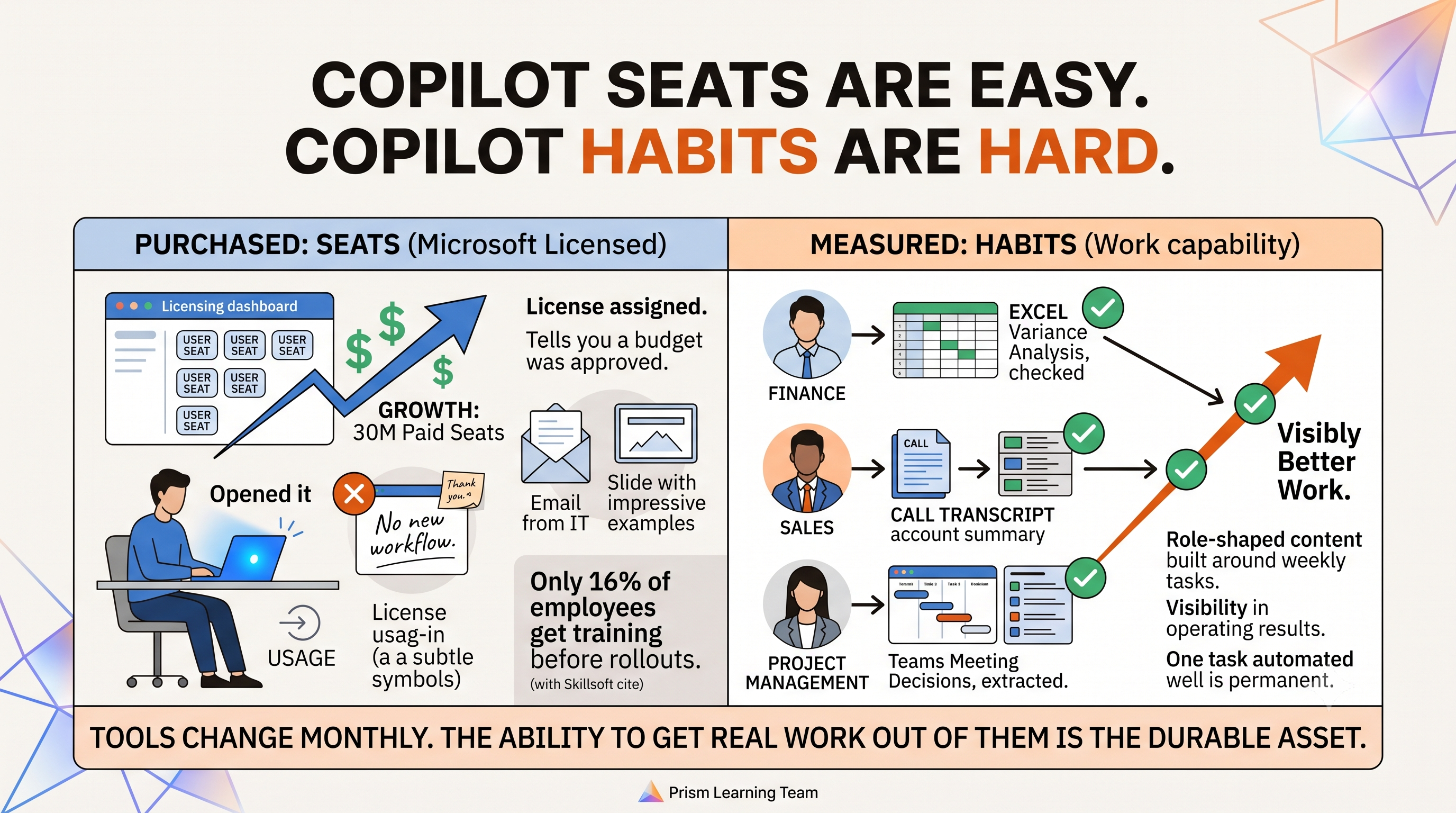
On July 29, Microsoft closed out its fiscal year and reported that Microsoft 365 Copilot has passed 30 million paid seats. That's up from 20 million the previous quarter, and 15 million the quarter before that. Net seat additions more than doubled quarter over quarter — the fastest stretch of paid growth the product has had.
It's a genuine milestone, and if you're one of the organizations that added seats this year, it means you're in good company. It also means the interesting question has moved.
Because a seat is a purchase. It tells you a budget was approved and a license was assigned. It doesn't tell you whether the person sitting in that seat does their job differently than they did in January.
That's the number nobody reports, and it's the only one that shows up in your operating results.
You remember the rollout. An email from IT, a 45-minute all-hands demo, a slide with a few impressive examples. For about a week, people tried things. Someone summarized a long email thread and told the whole team about it. Someone else asked it to build a deck and got something usable on the third try.
Then Q3 planning started, and the quarter got busy, and most people went back to doing the work the way they've always done it.
Six weeks later your license dashboard says adoption is healthy. Your team, if you ask them honestly, would tell you something else.
The number your license report can't give you
Usage telemetry answers one question: did this person open Copilot. That's a real signal, and it's worth watching. But it can't tell you the thing you actually need to know, which is whether anyone's work got better.
There's a wide space between "opened it" and "changed how I do my job." Most organizations are sitting in the middle of that space without a way to see where they are.
The gap shows up clearly when you ask both sides of the org the same question. In Skillsoft's 2026 Workforce Readiness Report, 77% of leaders said their employees are set up to succeed with AI. Only 24% of employees said they feel fully equipped. That's a 53-point disagreement about the same workforce.
Two more figures from the same body of research explain most of it. Only 16% of employees get any training before AI tools are rolled out to them. And in Resume Now's 2026 BYO AI Report, 41% of workers said their employer has given them no tools, training, or guidance at all to prepare for AI at work.
So the picture isn't that people are resisting the tool. It's that they got handed a very general-purpose instrument, with no instruction specific to their job, and were left to reverse-engineer the value on their own time.
The upside is real, which is exactly why the gap matters
None of this is an argument against Copilot. Microsoft's own Work Trend Index found that 70% of early Copilot users reported being more productive with it — a self-reported number from the vendor, so read it as directional rather than audited, but the direction is consistent with what we hear from teams who've gotten past the first month.
That's the frustrating part. The value shows up for people who build a habit. It doesn't show up for people who tried it twice in March. And the difference between those two groups almost never comes down to how smart they are or how much they like AI. It comes down to whether anyone showed them what good looks like in their specific job.
Why generic AI training doesn't close it
Most organizations that notice the gap respond by buying AI literacy content. A course on how large language models work, a module on prompt engineering, a section on responsible use. All fine. None of it transfers.
Here's why. "Using Copilot" isn't one skill. It's a different skill in every seat.
For someone in finance, it's getting Copilot in Excel to build the variance analysis they currently rebuild by hand every month — and knowing when the output is wrong, because it sometimes is.
For someone in sales, it's turning a messy call transcript into an account summary and a follow-up sequence that doesn't read like it was written by a machine.
For a project manager, it's using Copilot in Teams to pull the actual decisions out of a meeting nobody took notes in.
Those are three unrelated workflows, three different failure modes, and three different definitions of "good." A course that teaches prompting in the abstract prepares someone for none of them. People finish it, feel briefly informed, and still don't know what to do differently on Monday.
The instinct to teach the tool is right. The mistake is teaching the tool instead of the job.
What actually moves the number
Across the teams we work with, the programs that produce a visible change share four traits.
They're role-shaped. Content is built around the tasks a specific role already does every week, not around Copilot's feature list. The unit of learning is a workflow, not a capability.
They're short and repeated. 15 minutes a day beats a half-day workshop, and it isn't close. Habits are built by frequency, not duration. A half-day session produces a well-informed team on Tuesday and no behavior change by the following Monday.
They involve doing the work, with feedback. Watching someone else write a good prompt is roughly as useful as watching someone else lift weights. People need to write their own, see where it fell short, and try again. That feedback loop is the whole mechanism — everything else is setup.
They're measured at the capability level. Not seats. Not logins. Not course completions. Whether people can now produce a real work output they couldn't produce before, and whether that holds up 60 days later.
That last one is the hardest and the most valuable. It's also the only version of this that survives a conversation with a CFO who wants to know what the license spend bought.
Three questions worth asking this week
If you want a quick read on where your organization actually sits, these three will tell you more than a usage dashboard:
- Can you name a specific recurring task, in a specific role, that takes measurably less time now than it did in January? Not a demo — a real task someone does every week.
- If you asked ten people on one team to use Copilot on the same work problem, how much would the quality of their outputs vary? Wide variance means people are improvising, not practicing.
- Does anyone own AI capability the way someone owns security training or onboarding? If the answer is "IT rolled it out," nobody owns it.
If those land uncomfortably, that's useful information. It means the tool is in place and the capability layer isn't — which is a much easier problem to fix than the reverse.
Where Prism Skills fits
Prism Skills is the practice layer that sits on top of the tools you've already bought. Learners get role-specific lessons built around the work they actually do, 15 minutes at a time, with hands-on practice in a guided sandbox and instant AI feedback on what they produced. Team leads get analytics that report capability, not seat counts — so the question "is this working" has an answer.
We're an independent Microsoft partner, and Copilot is the tool most of our enterprise customers are working to land right now. But the approach isn't tied to it. The same gap opens up under ChatGPT Enterprise, under Gemini, under whatever your team is issued next. Tools change every few months. The ability to get real work out of them is the durable asset.
Thirty million seats is Microsoft's number, and they earned it. The one that belongs to you is what your team can do six weeks from now that they couldn't do today. If you're not sure what the seats bought you, that's a fair place to start — and it's answerable.
See how Prism Skills works for teams
Microsoft 365 Copilot is a trademark of Microsoft Corporation. Prism Skills is an independent Microsoft partner; the views and findings presented here are Prism Skills' own and are not endorsed by Microsoft.
Sources: Microsoft FY26 Q4 earnings release and analyst call, July 29, 2026; Skillsoft Workforce Readiness Report: AI Edition (2026, n=2,000); Resume Now BYO AI Report (2026, n=1,020); Microsoft Work Trend Index (self-reported).